
Imagine building your next AI project without having to come up with long, bogus prompts for the model.
In the AI world, especially using GenAI and LLMs, one of the most popular words you hear is prompts. Prompting is the act of giving an LLM model input or instructions to guide it towards a desired output. It is usually written in natural language, either in json, markdown, xml, or simple text format.
Prompt Engineering
Prompt engineering is a crucial step in building AI systems because a good portion of your model performance is tied to the prompt. You have probably seen a prompt shared by someone for people to re-run and hopefully get some expected result. However, personalizing these prompts could be a pain. How do you know what to change to get your desired results? Or maybe you’re trying to come up with the right prompt by yourself to get your desired output. How do you know what extra context to add or take out? Do you make it more specific or more generic? Do you need to add more positive or negative examples?
Prompt engineering is a whole area which I can go more in-depth on in another article, and it is constantly evolving.
In 2026, prompt engineering has progressed from simple input text, to include context engineering, role assignments, guardrail settings, and many other functions. There are also a lot of techniques like few-shot prompting, chaining, etc. to improve your prompt for better results, a lot of which just adds more text to the prompt.
Downsides of Prompting Today
While prompt engineering has greatly evolved and improved recently, there are still some disadvantages to the popular way of prompting we know today.
- Prompts can get very massive. Sometimes, it could get up to thousands of lines of long, messy, fragile, text; difficult to scale as the project grows.
- It could also be difficult to manage multiple, ever-changing versions of the prompt and incorporate self-improvement into these prompts.
- Another challenge is understanding what a good prompt is, how to know what changes in the prompt led to improvements in model results, or what aspect of the prompt is most optimal.
- Prompts sometimes break randomly and are difficult to debug.
- Plus, honestly, we are not all good at writing long texts. Sometimes, we write really long irrelevant prompts which even confuse the model more and just increase token spends. It could feel like we’re all just playing a never-ending guessing game.
To not miss out on any new articles, consider subscribing.
DSPy
I found out about this framework last year and I was really intrigued. Declarative Self-improving Python (DSPy) proposes prompts as code. It treats LLM prompts as programs, not just text strings. Instead of writing long prompts in natural language, you write modular, structural code that automatically generates the right prompt for the LLM.
This way, as a software engineer or AI engineer, you don’t have to context switch from programming paradigms to work on your prompt in natural language, you stay within a consistent, code-driven paradigm that’s easier to understand and reason about.
In this article, I’ll show you how to create a multi-step AI article writer that automatically generates structured articles, with multiple sections, on any topic using DSPy’s prompt engineering framework. One agent generates outlines, another writes detailed sections broken down by subheadings, utilizing DSPy’s ChainOfThought approach to enforce structured reasoning and move beyond traditional prompt engineering.
DSPy Core Architecture
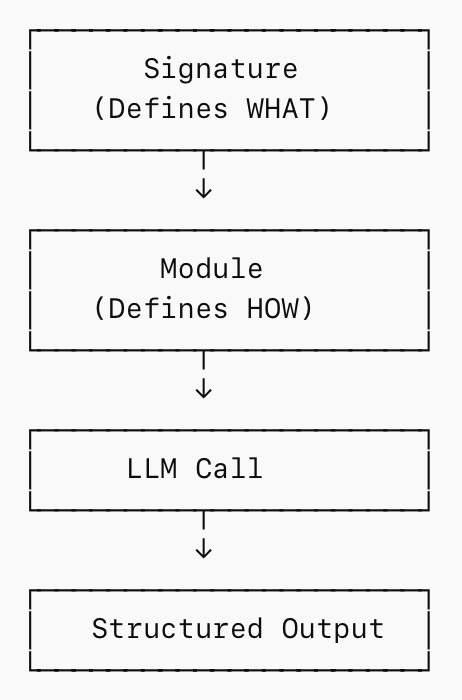
The two main architectural patterns under the DSPy framework are signatures and modules.
- Signature: Signature is the template/schema for the data to be passed to the model; depicted by dspy.Signature. It defines WHAT the input and output is.
For example, the Outline Signature below says:
Input: Give me a topic (string)
Output: I’ll give you: A title (string), a list of section names, and a dictionary mapping sections → subheadings
class Outline(dspy.Signature): “”“Outline a thorough overview of a topic.”“” topic: str = dspy.InputField() title: str = dspy.OutputField() sections: list[str] = dspy.OutputField() section_subheadings: dict[str, list[str]] = dspy.OutputField(...)
The Draft Signature below defines the input and output for the actual writing agent. This Signature says:
Input: Give me a topic, section heading, and subheadings
Output: I’ll write the full section content in markdown
class DraftSection(dspy.Signature): “”“Draft a top-level section of an article.”“” topic: str = dspy.InputField() section_heading: str = dspy.InputField() section_subheadings: list[str] = dspy.InputField() content: str = dspy.OutputField(desc=”markdown-formatted section”)
- Module: Module is the executable component that defines how your system operates. It encapsulates the logic, flow, and composition of LLM calls. It defines HOW. In DSPy, you define this using dspy.Module.
For example, this is a multi-step DSPy module. One submodule generates the outline, while another drafts each section. Each component has a specialized role, and the parent module orchestrates the full writing workflow.
class ArticleWriter(BaseDSPyModule): def __init__(self, config): super().__init__(config) self.setup_lm() # Configure the LLM # Agent 1: Outliner self.build_outline = dspy.ChainOfThought(Outline) # Agent 2: Section Writer self.draft_section = dspy.ChainOfThought(DraftSection) def forward(self, topic: str): # Step 1: Create outline outline = self.build_outline(topic=topic) # Step 2: Draft each section (loop) sections = [] for heading, subheadings in outline.section_subheadings.items(): section = f”## {heading}” formatted_subheadings = [f”### {subheading}” for subheading in subheadings] section_content = self.draft_section( topic=outline.title, section_heading=section, section_subheadings=formatted_subheadings ) sections.append(section_content.content) return dspy.Prediction(title=outline.title, sections=sections)
Run the module
# Configure your LM (example)dspy.settings.configure(lm=dspy.OpenAI(model=”gpt-4o-mini”))# Initialize modulewriter = ArticleWriter()# Executeresult = writer(topic=”How AI is changing product management”)print(”OUTLINE:n”, result.outline)print(”nARTICLE:n”, result.article)
These are the most important concepts to get started with DSPy.
With DSPy, we transition from prompt engineering being about “write a good prompt”, to designing a system with stages, roles, and reasoning.
DSPy Building Blocks
DSPy gives you modular components for structuring how your AI system thinks, reasons, and interacts with the world. These are prebuilt DSPy modules that implement different reasoning patterns, all built on top of the dspy.Module abstraction.
- dspy.Predict() — Direct generation
Use this when you want fast, low-cost outputs without explicit reasoning.
Best for: classification, extraction, simple transformations.
- dspy.ChainOfThought() — Structured reasoning
Forces the model to think step-by-step before producing an answer.
Best for: complex logic, multi-step problems, higher accuracy tasks.
Tradeoff: higher token cost and latency. - dspy.ReAct() — Reasoning + tool usage
Combines thinking with the ability to call external tools (APIs, search, functions).
Best for: agents, workflows, real-world decision systems.
Tradeoff: more complexity and harder to debug.
For example, in the article writing AI system:
- Predict() could generate the first draft
- ChainOfThought() improves reasoning quality
- ReAct() could pull in external data or tools like web search, citing sources, generating images for the article.
All these might sound strange and difficult to believe.
How does DSPy really work internally?
- The field names act as AI instructions. Titles, headings, and entities in the code have semantic meaning that map to what the goal of the prompt is.
- AI infers what to extract from field names.
- Type hints guide output format.
You can better understand how DSPy works by exploring its underlying code on GitHub.
Key Design Patterns
- Signature-First Design: You define your data contracts before implementation. Instead of starting with prompts, you start with structure. Clearly specifying inputs and expected outputs. This makes the system more predictable and easier to scale. Because of this, the LLM isn’t guessing what to produce, it’s guided by a defined schema. Field names, types, and descriptions act as implicit instructions, improving consistency and output quality.
- Agent Specialization: Work is often divided across specialized agents, each focused on a single outcome.
- Outliner agent = planning specialist
- Section writer agent = content specialist
Each agent does one thing well, which leads to better performance, easier debugging, more modular system design, and simpler optimization. In the article writer AI system, we apply the same principle using DSPy modules, with each component focusing on one outcome.
Why DSPy over regular prompting?
- Outputs become more reliable
- Systems become reusable
- Behavior becomes easier to debug
- Closer to real software engineering instead of tweaking words
DSPy is not just a way to write cleaner prompts, it’s a new way to approach building AI systems.
Prompting is evolving and DSPy is one of the innovative tools in this evolution. The prompt does not have to be so separate from the rest of the code when it can be programmed like the rest of the AI system.
In a subsequent article, I’ll go over some advanced techniques using DSPy, including prompt optimization and model fine-tuning for better performance. Subscribe below to get notified when it’s published.
Instead of thinking of how you can craft the perfect prompt for your next AI system, ask yourself how you can build a programmatic system to automate your prompt engineering.
Let me know if you give it a try; I’d love to hear your thoughts. You can explore the full AI article writer demo project on GitHub: https://github.com/AniekanInyang/Dspy_Project
Thanks for reading Aniekan’s Blog! This post is public so feel free to share it.
To not miss out on any new articles, consider subscribing.

